


Simify eSim Review: We Used It Across Australia And Tasmania (vs Airalo)
I’ve become weirdly obsessed with eSIMs lately. Probably because I travel so much and I’m completely over the whole landing-in-a-new-country-and-immediately-having-to-deal-with-SIM-cards thing. Especially now on family trips, when I’m travelling with my wife and son. The last thing I want after a long haul flight is standing in some airport kiosk while a guy tries to upsell me “unlimited” data that somehow stops working the second you leave the city centre. So when Simify reached out and offered us one of their eSIMs to test during our Sydney and Tasmania trip, I was definitely interested, but also pretty sceptical.
There are SO many average eSIM companies now, all promising the same thing. Fast speeds, global coverage, easy setup, blah blah blah. But to be fair to Simify, this one actually delivered. My wife used it throughout the whole trip around Australia and honestly, it was smooth from start to finish. AND IT’S UNLIMITED!!! That’s literally the main selling point for me when I choose an eSim these days. That, and allowing hotspotting to my laptop for work/netflix. Simify ticks both boxes.
- If you want to skip ahead and grab the same eSIM we used, here’s the one HERE
*Simify gave us this eSIM for review. This post contains affiliate links!

Table of contents
- Simify eSim Review: We Used It Across Australia And Tasmania (vs Airalo)
- What Is Simify?
- Why We Tried Simify
- Setting Up The Simify eSIM
- Using Simify In Sydney
- Simify Coverage In Tasmania
- Simify vs Airalo
- Can You Hotspot With Simify?
- Is Simify Legit?
- Pros And Cons Of Simify
- Is Simify Worth It?
- Final Verdict: Would We Use Simify Again?
What Is Simify?
Simify is basically a travel eSIM company from Australia that lets you install mobile data onto your phone before you travel. So instead of landing somewhere new and immediately hunting around for a SIM card shop, you just scan a QR code before your trip, activate it when you land, and you’re online. At least that’s the idea.
The reality with travel eSIMs is some are brilliant and some are complete nonsense. I’ve had eSIMs before where they worked perfectly in capital cities and then completely collapsed the second you left civilisation. Others were so annoying to activate I nearly gave up and bought a physical SIM card anyway.
So for this Simify review I was actually pretty curious to see how it would hold up properly during real travel, not just sitting in a hotel connected to WiFi pretending everything is amazing.
Why We Tried Simify
Australia felt like a pretty good test because people assume connectivity there is automatically world class everywhere, but once you start moving around outside major cities, especially in Tasmania, that’s definitely not always the case.
And honestly, good internet matters so much more to me these days than it used to. Modern travel basically depends on data now. Google Maps, Uber, restaurant searches, booking hotels last minute, translating stuff, WhatsApp calls, Instagram uploads, ferry schedules, random “best coffee near me” searches. If your internet stops working while travelling your entire day suddenly becomes annoying. Especially travelling with family.
So instead of me testing it, my wife used the Simify eSIM throughout the trip because realistically she’s the tougher critic. If something is irritating while travelling, I hear about it very quickly.

Setting Up The Simify eSIM
Thankfully this part was ridiculously easy. The eSIM got emailed over before the trip and my wife installed it before we even left Thailand. One thing I liked immediately was the fact the package didn’t activate the second we received it. Some companies start the countdown immediately which honestly feels ridiculous if your flight isn’t for another week.
With Simify we just installed it beforehand, landed in Sydney, switched it on, and connected almost instantly.
No airport SIM card queues.
No ejector pin nonsense.
No tiny plastic SIM cards disappearing into the floor.
No asking random airport staff for help.
After years of travel, convenience has become one of the biggest luxuries in the world for me.
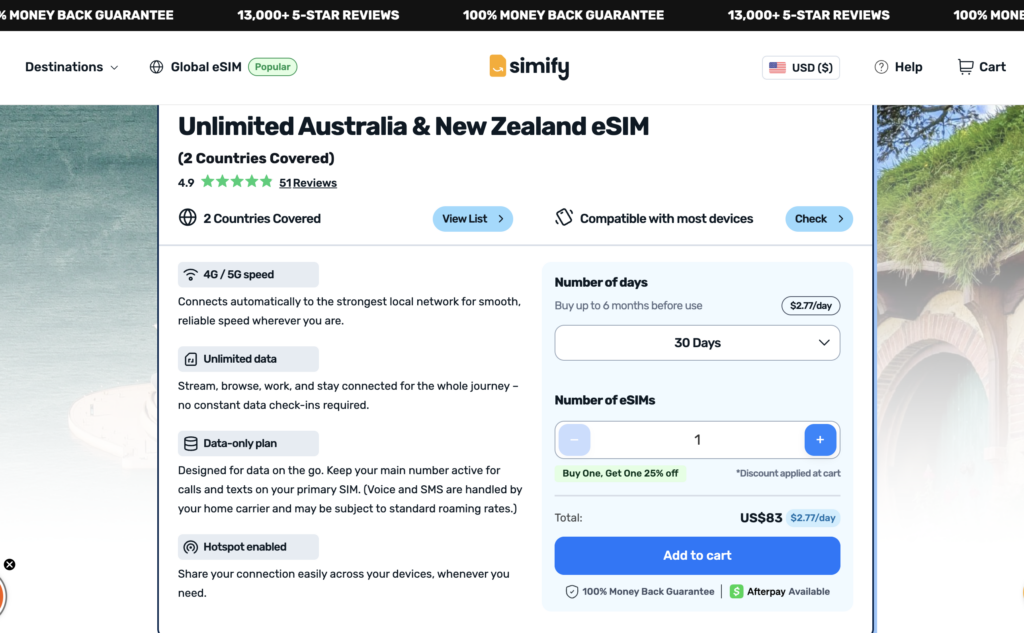
How much our Simify eSim cost
Get ready for this…. USD 2.77/day, or USD 2.35/day with MY code STEP15!
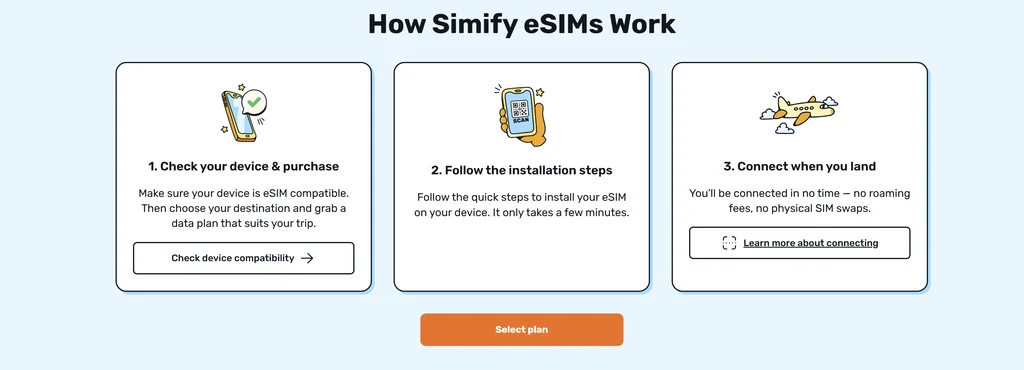
How Simify eSims work
Pretty simple really… But in a basic step by step it’s this:
- Downloaded the app
- Purchase (discount if you use the code STEP15)
- Follow the on-screen instructions to install and activate. All-in, it legit takes about about 3 minutes!
Using Simify In Sydney
Sydney wasn’t the real test, Tasmania would be. But still, with my wife and mother-in-law landing at the aiport without me, IT NEEDED TO WORK INSTANTLY!
So, this is usually where I judge whether travel internet is actually good or not. Because the second you land somewhere new, you need data immediately. You’re ordering an Uber, checking hotel details, figuring out where you are, messaging family, searching directions, opening maps, trying not to get ripped off by airport taxis. If the connection is annoying, you notice straight away.
Thankfully Simify connected almost immediately after Jaa landed in Sydney airport and from there it just quietly worked in the background the entire time.
Restaurants, cafes, ferries, booking stuff, checking directions, uploading Instagram stories, random Google searches, all the normal travel chaos. The connection stayed consistently solid throughout Sydney and honestly, that’s exactly what I want from travel internet. I don’t want to THINK about it. If I’m actively noticing my mobile data while travelling, something has already gone wrong. There were no weird disconnects, no “SOS only”, no random moments where Google Maps suddenly stopped working halfway somewhere unfamiliar.
It just worked. Which honestly sounds basic, but in the eSIM world it’s surprisingly not guaranteed!

Simify Coverage In Tasmania
Tasmania was the part I was genuinely interested in for this Simify review because Sydney is easy. Pretty much every network on earth works in Sydney. Tasmania is where things get more interesting. And honestly? Simify held up really well.
We road tripped around Tasmania using the eSIM throughout the whole trip and the connection stayed consistently reliable almost everywhere we went. Google Maps worked properly, hotspotting worked, WhatsApp worked, Instagram uploads worked, and there were never any moments where we suddenly found ourselves driving around lost wondering where the hell we were supposed to be.
One thing that actually made me appreciate it more was one Airbnb we stayed in that had terrible WiFi. Like properly bad. Normally that becomes a nightmare immediately, especially when you still need to get some work done while travelling. But because the Simify connection was stable, my wife just hotspot the laptop and carried on without issues.
That’s actually one of the biggest advantages of good travel data now. Hotel and Airbnb WiFi around the world is still surprisingly terrible a lot of the time.

Simify vs Airalo
A lot of people searching for a Simify review are probably comparing it to Airalo because Airalo dominates the eSIM market online right now.
And honestly, Airalo is decent. I’ve used it before without major problems.
But these days every eSIM company basically says the exact same thing. Best coverage, easiest setup, unlimited data, global plans, fastest speeds. Every website looks almost identical. The difference is what happens when you actually travel with it.
For me, Simify felt smooth and stress free throughout the trip. The setup worked immediately, the coverage stayed reliable, and hotspotting worked properly which is actually a huge thing because some “unlimited” eSIM companies quietly throttle hotspotting into oblivion.
And honestly, these days I value convenience more than saving another few dollars somewhere else.
Can You Hotspot With Simify?
Yep, and this was actually one of the best parts.
A lot of unlimited eSIM providers either block hotspotting completely or limit it heavily. Simify worked properly for hotspotting during the trip which became especially useful in Tasmania when accommodation WiFi wasn’t great. Being able to hotspot properly is massively underrated now, especially if you travel long term or work remotely while moving around.
Is Simify Legit?
Yeah definitely.
And honestly I understand why people search this because there are SO many random eSIM companies now.
But Simify felt professional the whole way through. Setup was easy, instructions were clear, activation worked immediately, and the coverage stayed reliable throughout the Australia trip.
Which honestly already puts them ahead of a lot of travel eSIM companies.
Pros And Cons Of Simify
The biggest positive for me was honestly how little I had to think about it. That’s the dream with travel internet. You don’t want your SIM card becoming part of the story.
Coverage around Sydney and Tasmania was consistently good, setup was easy, hotspotting worked properly, and there were no weird technical headaches during the trip.
The only realistic downside is the same thing you’ll get with pretty much every eSIM provider on earth: if you go REALLY remote, signal can still get patchy because ultimately they’re relying on local networks underneath.
But for normal travel around Australia? Absolutely solid.
Is Simify Worth It?
For Australia travel specifically, yeah, definitely.
Especially if you’re travelling as a family, road tripping around different parts of the country, landing late at night, or simply cannot be bothered dealing with local SIM cards anymore. Could you maybe save a little money buying a local SIM card instead? Probably.
100% sure though, these days convenience matters more to me. Landing in Sydney and instantly having working internet without thinking about it is worth paying for.
Final Verdict: Would We Use Simify Again?
Yeah, absolutely. If you want to use the same eSim we did, you can do that HERE.
After using Simify across Sydney and Tasmania during our Australia trip, I can honestly say it was one of the smoother travel eSIM experiences we’ve had.
The setup was easy, activation worked immediately, the coverage stayed reliable, hotspotting worked properly, and most importantly it never caused stress during the trip.
Which honestly is exactly what you want from travel internet.
No airport kiosk nonsense.
No swapping SIM cards.
No surprise roaming bills.
No headaches.
Just working internet while travelling around Australia. And these days, that’s a massive win.

Remember, never travel without travel insurance! And never overpay for travel insurance!
I use HeyMondo. You get INSTANT quotes. Super cheap, they actually pay out, AND they cover almost everywhere, where most insurance companies don't (even places like Central African Republic etc!). You can sign-up here. PS You even get 5% off if you use MY LINK! You can even sign up if you're already overseas and traveling, pretty cool.
Also, if you want to start a blog...I CAN HELP YOU!
Also, if you want to start a blog, and start to change your life, I'd love to help you! Email me on johnny@onestep4ward.com. In the meantime, check out my super easy blog post on how to start a travel blog in under 30 minutes, here! And if you just want to get cracking, use BlueHost at a discount, through me.
Also, (if you're like me, and awful with tech-stuff) email me and my team can get a blog up and running for you, designed and everything, for $699 - email johnny@onestep4ward.com to get started.
Do you work remotely? Are you a digital nomad/blogger etc? You need to be insured too.
I use SafetyWing for my digital nomad insurance. It covers me while I live overseas. It's just $10 a week, and it's amazing! No upfront fees, you just pay week by week, and you can sign up just for a week if you want, then switch it off and on whenever. You can read my review here, and you can sign-up here!









 As you know, blogging changed my life. I left Ireland broke, with no plan, with just a one-way ticket to Thailand
and no money. Since then, I started a blog, then a digital media company, I've made
more than $1,500,000 USD, bought 4 properties and visited (almost) every country in the world. And I did it all from my laptop as I
travel the world and live my dream. I talk about how I did it, and how you can do it too, in my COMPLETELY FREE
Ebook, all 20,000
words or so. Just finish the process by putting in your email below and I'll mail it right out to you immediately. No spam ever too, I promise!
As you know, blogging changed my life. I left Ireland broke, with no plan, with just a one-way ticket to Thailand
and no money. Since then, I started a blog, then a digital media company, I've made
more than $1,500,000 USD, bought 4 properties and visited (almost) every country in the world. And I did it all from my laptop as I
travel the world and live my dream. I talk about how I did it, and how you can do it too, in my COMPLETELY FREE
Ebook, all 20,000
words or so. Just finish the process by putting in your email below and I'll mail it right out to you immediately. No spam ever too, I promise!