

Smart, Simple Minecraft Bedrock Hacks
First, quick line: don’t cheat on public servers. Use these in single‑player or in private worlds where everyone agrees. We’re talking clean tricks, settings, and allowed add‑ons. Not shady clients.
What “Hacks” Really Mean Here
People say minecraft bedrock hacks and usually mean simple things that make play easier:
- Clear settings that cut lag and confusion.
- Visual packs that improve clarity but don’t change gameplay.
- Keybinds that fit your hands.
- Small redstone and building tricks that save time.
- Add‑ons the world owner allows.
That’s the scope. Safe, practical, repeatable.
Core Settings That Do Most Of The Work
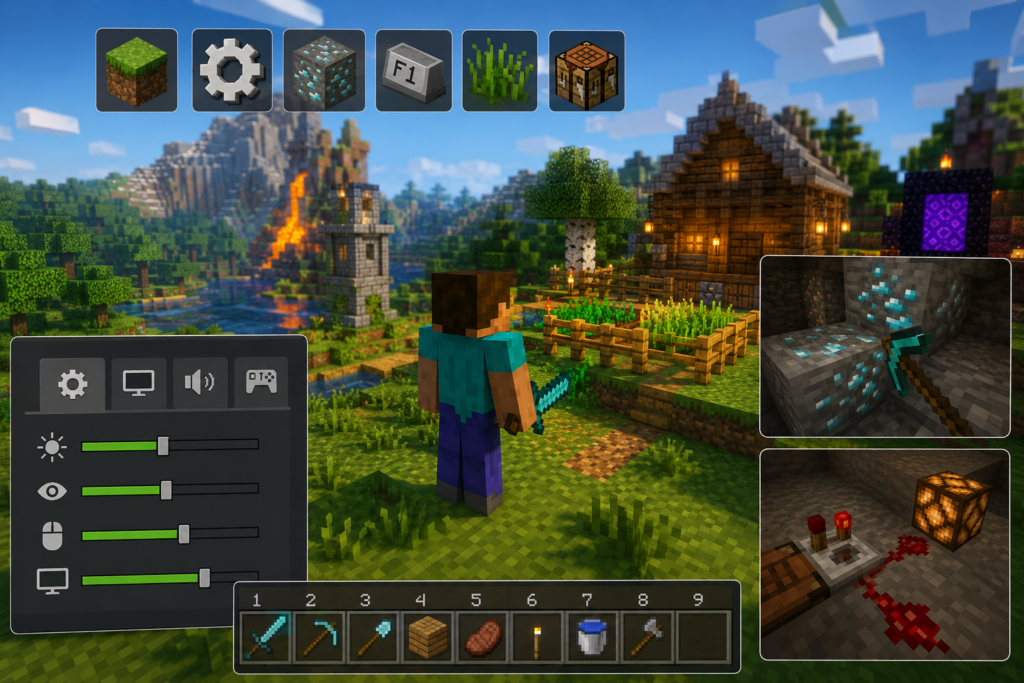
Turn on Show Coordinates. You always know XYZ. Meetups and mining get fast. Lower render distance while exploring. Stutters drop. Raise only for screenshots. Switch to Classic UI on console. More slots on screen. Fewer menus. Turn off camera bob and screen shake. The view stops wobbling. Aim gets steady. Cap FPS at 60 or enable VSync if frames jump. Fewer micro hitches.
These five changes fix more pain than any “secret trick.”
Visual Tweaks That Stay Fair
Use a high‑contrast ore pack. Diamonds pop against deepslate, but gameplay stays the same. Try low‑fire textures. You can see in lava fights without removing danger. Clean glass helps with farms and aquariums. Fewer streaks, clearer view. Use a brighter crosshair and a readable font. Small screens stop lying to your eyes.
This is what hacks for minecraft bedrock often means in real life: better visibility.
chatgpt.com
Input And Control Shortcuts
Remap crouch to a bumper or a side mouse button. Bridging gets safer. Move Drop far from WASD or your main buttons. Save your gear. Set hip‑fire sensitivity a bit lower, aim sensitivity a bit higher. Tests on a wall until the 180s feel smooth. On touch, use Split Controls. It feels odd for a day, then it’s precise forever.
Tiny tweaks. Big comfort.
Movement And Combat Tricks
Sprint‑jump on flat ground. It’s faster than a sprint alone. Watch hunger. Block with a shield on the hit, then step in. Don’t turtle. Do criticals: jump and hit on the way down. You’ll hear the crack. Mobs drop fast. Boat clutch to survive falls. Place, enter, live. Practice from trees. Keep a powder snow or water bucket in your hotbar. Panic saves happen.
Nothing magical. Just muscle memory.
Mining Plans That Beat Random Wandering
Dig a two‑wide main tunnel at the right Y level. Branch every three blocks. Torches every eight. Clean and safe. Pour water on lava lakes. You get an obsidian floor and open edges where ore shows. Use Fortune on ores, Silk Touch on blocks you want pretty. Keep both picks on the bar and swap fast. Carry doors for underwater caves. Place one and breathe. Still works, still good.
Simple plans win because you stick to them.
Building Tricks For Fast Depth
Push roofs out by one block. Overhangs add shadow with zero cost. Break flat walls with stairs and slabs. Instant depth. Frame windows with trapdoors. Add flower pots and a lantern. Cheap style. Use dirt or scaffolding as temporary blocks. Shape first, pretty later.
Your house stops looking like a box in ten minutes.
Small Farms That Don’t Lag Or Sprawl
Make a 9×9 field with water in the center. Fence it. Food is solved. Build one simple villager iron farm. One cell can fund tools for weeks. Use a dripstone‑edge mob pit. Light cave floors leave the pit dark. Drops come to you.
Keep farms close to base so you actually use them.
Bedrock‑Specific Little Wins
Throw a trident with Channeling during a storm. Charged creepers on demand. Stand back. Make nether highways around Y ~100 in tunnels. Slab paths stop spawns. Travel is fast. Keep villager beds near workstations. Short paths mean fewer weird routes.
Small quirks, steady payoff.
Inventory Habits That Save Time
Pick a hotbar layout early or you’ll spend half your time looking for things. One stack of logs becomes many stacks later. Sort loot before you log off. One minute now saves ten tomorrow.
Boring habits feel like magic a week later.
Multiplayer Notes Without Drama
Agree on what “minecraft hacks for bedrock” are allowed. Texture clarity? Mini‑maps? Low‑fire? Decide first. Keep heavy redstone away from spawn so new players don’t lag. If your group ever switches to Java for big modpacks, look up minecraft forge server hosting to keep a shared world online without one player’s PC running all day.
chatgpt.com
What Not To Do
Don’t download shady “free hack clients.” Many steal accounts or drop malware. Don’t x‑ray or dupe on public servers. Admins catch patterns. Bans stick. Don’t follow three‑year‑old glitch videos. Most are patched. You waste an evening.
Final Bit, Straight Talk
Most useful minecraft bedrock hacks are not flashy. They are clean settings, clear visuals, tight keybinds, and small routines you repeat. Do these and the game gets calmer, faster, and less annoying. Build small. Finish often. Keep your world tidy. Your future self will think you’re a genius—even if the “genius move” was just turning on coordinates and moving your crouch key.
Remember, never travel without travel insurance! And never overpay for travel insurance!
I use HeyMondo. You get INSTANT quotes. Super cheap, they actually pay out, AND they cover almost everywhere, where most insurance companies don't (even places like Central African Republic etc!). You can sign-up here. PS You even get 5% off if you use MY LINK! You can even sign up if you're already overseas and traveling, pretty cool.
Also, if you want to start a blog...I CAN HELP YOU!
Also, if you want to start a blog, and start to change your life, I'd love to help you! Email me on johnny@onestep4ward.com. In the meantime, check out my super easy blog post on how to start a travel blog in under 30 minutes, here! And if you just want to get cracking, use BlueHost at a discount, through me.
Also, (if you're like me, and awful with tech-stuff) email me and my team can get a blog up and running for you, designed and everything, for $699 - email johnny@onestep4ward.com to get started.
Do you work remotely? Are you a digital nomad/blogger etc? You need to be insured too.
I use SafetyWing for my digital nomad insurance. It covers me while I live overseas. It's just $10 a week, and it's amazing! No upfront fees, you just pay week by week, and you can sign up just for a week if you want, then switch it off and on whenever. You can read my review here, and you can sign-up here!






 As you know, blogging changed my life. I left Ireland broke, with no plan, with just a one-way ticket to Thailand
and no money. Since then, I started a blog, then a digital media company, I've made
more than $1,500,000 USD, bought 4 properties and visited (almost) every country in the world. And I did it all from my laptop as I
travel the world and live my dream. I talk about how I did it, and how you can do it too, in my COMPLETELY FREE
Ebook, all 20,000
words or so. Just finish the process by putting in your email below and I'll mail it right out to you immediately. No spam ever too, I promise!
As you know, blogging changed my life. I left Ireland broke, with no plan, with just a one-way ticket to Thailand
and no money. Since then, I started a blog, then a digital media company, I've made
more than $1,500,000 USD, bought 4 properties and visited (almost) every country in the world. And I did it all from my laptop as I
travel the world and live my dream. I talk about how I did it, and how you can do it too, in my COMPLETELY FREE
Ebook, all 20,000
words or so. Just finish the process by putting in your email below and I'll mail it right out to you immediately. No spam ever too, I promise!